);
Home
Shop

How to Speed up Data Transfer to and from External Drive

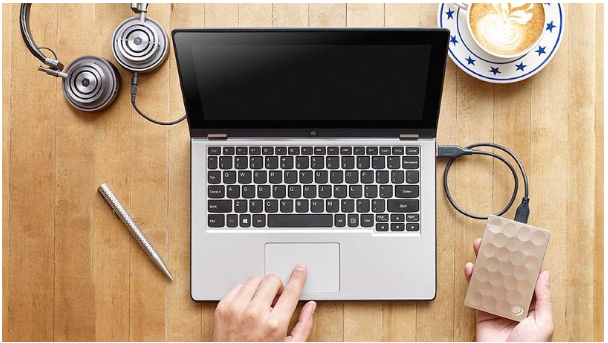
Slow data transferring speed can be very annoying at times especially if you have to transfer the data to and from the external drive quite often. Like it can be very troublesome to wait for 10 to 15 minutes for your files to move from one place to another especially if you are getting late for a meeting or a conference etc. Now if you are someone who is tired of this slow speed, then you are at the right place, reading the correct article. Today we are going to jot down a few ways through which you can optimize and improve the data transfer speed. So, folks take notes of what we are about to tell you because this article can be handy for you in the long run.

1. Set Your USB Drive To Better Performance

You see the default setting of Windows for data transfer is set on the option of “Quick removal”, in this case, what actually happens is that it disables writing cache which ultimately slows down the speed of transfer, but on the other hand, with it you can safely disconnect your device once the data has been transferred. Now what you have to do is to shift from “Quick Removal” to “Better Performance” in the settings and also look for the “write caching on device” option and enable it to optimize and improve the speed of data transfer.

2. Upgrade To USB 3.0 / 3.1

You might know about the difference between USB 3.0 and USB 3.1 type C, and if you do know all about it, then you also would know that USB 3.0 and 3.1 are the latest USB standard that was released years ago yet many of the people are using USB 2.0 just because it is cheaper than the 3.0 one. Now this is where you will have to make a little sacrifice and if you feel like your work demands a lot of data transferring tasks from PC to or from external drive then you definitely should get yourself a USB 3.0 because believe it or not, that will make a big difference in all of the transferring speed.

3. Change The File System

Not many know about it that the file system that is being used to format your device can have a severe and significant impact on the performance and the speed of data transfer.Now what happens is that the conservative format locates the data into tiny chunks and that is precisely where the problem begins. The smaller the chunks of the data are, the slower the transfer process will be, and to improve the speed you will have to increase the size of the chunks, and for that, you need to change the file system and the formatting.


Fix Annoying Problems Simply by Rebooting Your Computer

Any time you ask a computer savvy person about a problem with Windows, one of the first things they’ll typically ask is if you actually tried to reboot the computer.

This may seem like an odd response, and it may even seem like they are being dismissive with you, but the truth is simple… Rebooting your computer works and it solves many problems.

Does the Restart Solution Only Work for Windows Users?

Absolutely not!

This solution is helpful to everybody no matter what brand of computer or tablet they happen to use.

Apple products certainly benefit from refreshing the computer or device with a restart. If your network goes down or your wireless router goes out, you’ll often hear that you should attempt to reset it to get it working again.

The same holds true for iPads, iPhones, android devices, and much more.

You could even benefit from restarting software that’s acting slowly, because you’ll help refresh the memory and speed up the program.

So, if your web browser happens to be acting up and going really slow, close it and open it up again. You’ll certainly see much greater improvements in speed this way.

According to Stackify, API applications experts, restarting computers and devices is a quick and easy way to solve simple to fix problems.

Which Problems Can Restarting Your Device Fix?

As you already know, restarting computers, software, and devices isn’t going to fix every one of your problems. But there are certainly specific issues that will benefit from a quick restart.

They include:

Windows Is Running Slowly

If Windows on your computer is running quite slowly, it’s possible that the program is misbehaving because one program happens to be draining 99% of your CPU resources and it’s slowing down Windows and other programs because of it.

Now a tech savvy person could easily go to the task manager and locate the process taking up all of the resources and slowing down Windows.

The average person, on the other hand, may find this impossible. But they could easily close down their computer in its entirety and give it a quick restart, right?

By doing so, the resource intensive process will shut down and your computer will begin running at a normal pace once again.

A Specific Application Is Taking up Too Much Memory

If you have a specific application taking up too much of your precious memory, you can discover which app it is through the task manager and close it down.

Or you could give your computer an entire restart to shut down the problem app that way.

Not that long ago, Firefox was a huge cause for PC memory leaks.

As you continued to use Firefox over time, it would begin to eat up more and more of your memory, and it would get slower and slower as you used it.

By closing down Firefox, it would then release all of the memory.

So, when you finally restarted the web browser again, you’d have a completely clean slate and none of your memory would leak any longer.

Unfortunately, some people are going to have applications on their computer that they don’t even realize eat up lots of memory.

If you do not know how to discover the application slowing down your computer, your best bet is to always give your computer a restart and refresh your memory completely.

Conclusion

It’s plain to see that we all run into minor computer problems throughout the day. Some are more difficult to handle than others.

If your computer is running slowly, it’s probably a single application eating up lots of your resources.

By restarting your computer, you will shut down the offending app in your computer will run much faster once again.


Source: Naijatechguide.com 

Top Security Concerns for IoT-Enabled Devices

Internet of Things or IoT, as it is commonly referred to, is the most advanced form of internet connectivity. IoT allows smart devices to connect to the internet and enables them to act independently and exchange data with each other.

As technology is becoming more and more advanced, IoT has made it possible for cars to drive themselves, devices to broadcast any type of information, and devices that are connected to the internet like smart TVs and smartphones can connect to one another and share files like music and videos. By the year 2020, there will be around 26 billion devices that are connected to each other, and this exploding growth in IoT devices will result in more user benefits. In addition to this, with the help of IoT, businesses will be able to make better decisions by analyzing data and generating useful information.

IoT Threat Solutions

Since most devices are interconnected through cloud services, there is a risk of attack by hackers and other online intruders. In order to deal these security risks, numerous companies and individual users have adopted IoT enabled solutions to protect their data from online threats.

These advanced security tools are not only being used by large corporations, a growing number of households have also implemented these security measures which shows that they are also compatible with home security.

The solutions offer a wide range of technical features like alert systems for your home, automatic door-lock systems, red alert for inappropriate temperature, video surveillance to protect your home, and smoke alarms. In addition to this, IoT allows you to access all the controls on your smart devices.

With the increased use of IoT supported devices and information sharing, online threats have also increased rapidly. For an experienced hacker, it only takes around 20 minutes to hack into another person’s computer and steal his/her personal information. To prevent this from happening, different developers are testing their products in terms of security and protection.

People are in dire need of protection because of the data stored in their computers which they cannot afford to lose, and this has significantly increased the demand for security products in the IoT industry.

Regularly Check for Updates

In order to stay protected online, it’s important to keep your devices up to date with the latest software and a secure and high speed internet connection like Frontier FiOS. New software applications almost always include the latest features that allow you to keep your important files away from hackers. So, it’s important to maintain device security and keep them updated at all times.

Use Strong Passwords

When you’re using an online account like Facebook or online banking, use strong passwords that are not easy to crack. According to research, most people fall victim to online fraud because their passwords are not strong.

Scan Your Network

It is important to scan your network on a regular basis in order to get rid of any unknown or unauthorized devices. You should run risk assessments on your computer and have all the necessary software to deal with the problems that arise when you suffer from an attack.

Use Two Factor Authentication

It is important to keep your data safe and secure from unauthorized personnel. You need to protect your files and documents with a strong password that is not easy to crack. To add to your security, you can use a Two Factor Authentication to help prevent hackers from attacking your accounts. In Two Factor Authentication, you need a password and you need to enter a code which is sent to your smartphone. These two steps enhance your security and keeps online threats away from attacking your personal information.

Password Manager

It can be hectic trying to remember the passwords for all your accounts and this is where a Password Manager comes in. A Password Manager is used to generate and manage all your passwords so that you can conveniently check which password belongs to which account.

Protecting the Access Points

Make sure that you protect the points of access of the connectivity so that you know which devices are connected to your network. You can lock the points of access with a strong password and you can even allow your smartphone to remotely access these controls. This technique will prevent outsiders from accessing your private network, decreasing the amount of risk involved in connecting your device to the internet.

Locate Your Devices

IoT allows you to remotely locate and control your devices. This means that you will never have to worry about losing your devices because you will always be able to locate them. Moreover, if your device gets stolen, you can always access and lock it with a pin, or erase all your data so that the important files are not stolen.

Threat of Viruses

Another major concern for internet users is the threat of viruses attacking their computers. In order to prevent viruses like Trojan Horse, you need to have anti-virus software installed in your computer with the latest updates. Moreover, anti-virus software helps detect and delete viruses from your computer, keeping it safe at all times. If worse comes to worst, you can always use a Reboot CD to remove the viruses from your computer if your anti-virus software fails to detect and delete the viruses from your device.

Conclusion

The rapid evolution of technology and the innovation of devices and features like home automation and video surveillance has been very beneficial to all internet users. However, as beneficial as IoT can be, it is equally dangerous as well. So, it is important to take all the necessary precautions before sharing confidential files on the internet. IoT enabled solutions promotes efficiency and safety, but it should be understood that the potential risk of getting attacked increases daily.


Back to Top
Product has been added to your cart